
 Tim Kencang.in
Sharing one account and password is a quick way to lose control: who changed that link's destination? Who deleted the client's campaign? Kencang.in's Teams feature gives each person their own account and configurable permissions, while keeping every link in one place.
How Teams and Workspaces work
The account owner, usually an agency or marketing manager, invites members by email. Members who accept sign in with their own accounts, then select a workspace: their personal account or the team account that invited them. In the team workspace, all links, QR codes, bio pages, and statistics created belong to the team account rather than the member. Nothing is lost when a member leaves.
Setting permissions
When inviting someone, set permissions for each feature: creating and editing links, managing QR codes and bio pages, viewing statistics, managing domains and pixels, and so on. Common patterns:
- Advertising specialist: links, pixels, statistics.
- Designer: QR codes and bio pages.
- Client: statistics only, to monitor without making changes.
- Account manager: everything except billing.
The principle of least privilege, granting only the permissions needed, is a standard security practice described by organizations such as NIST.
Separating work by client
Campaign
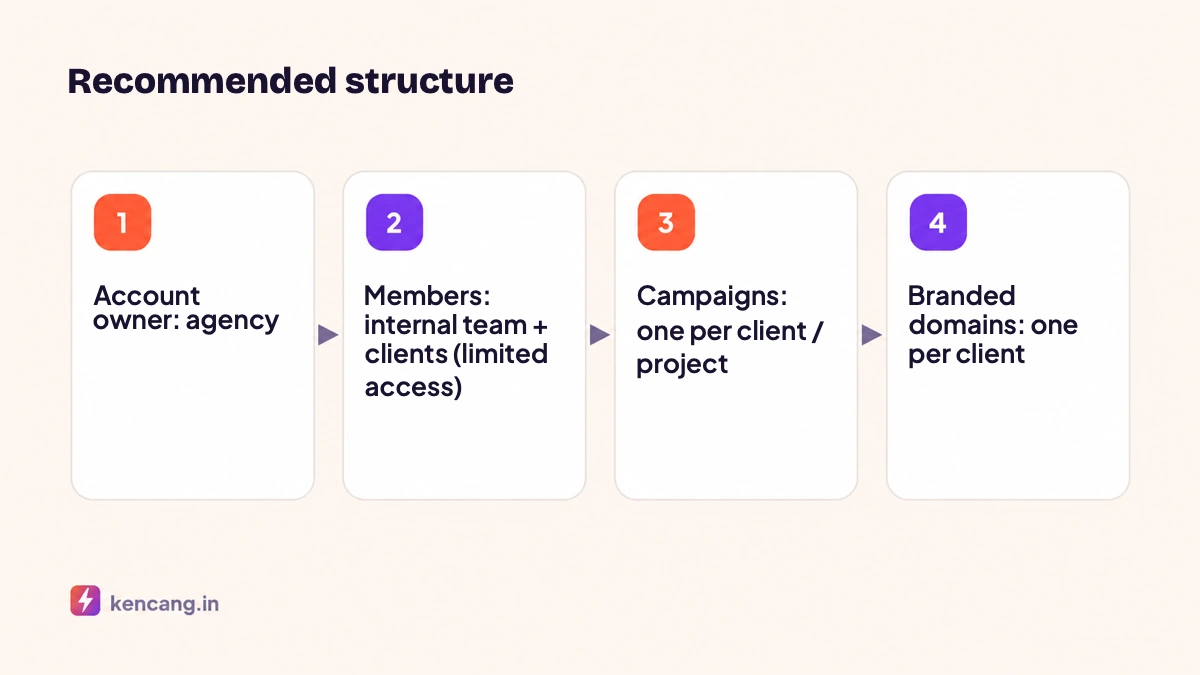
Create a Campaign for each client or project, then add all related links, QR codes, and bio pages. Combined campaign statistics simplify monthly reporting; you can attach exports directly for clients. Learn to read the figures in the article on reading the analytics dashboard.
Branded domains per client
The Business plan supports up to five domains. Connect go.klien-a.com and go.klien-b.com, and set the default domain when working for each client. See technical guidance in the article on branded domains.
Naming conventions
Agree on alias patterns and campaign names, for example klienA-ig-okt. Consistency makes searching easier when you have hundreds of links. Find alias tips in the article on custom aliases.
Recommended agency workflow
- Receiving a brief: account manager creates a Campaign and sets up aliases according to the content plan.
- Production: the designer creates QR codes and bio pages; the advertising specialist adds UTM and pixels.
- Launch: click notifications go to the client's Slack channel through the Slack integration.
- Report: export campaign statistics at month-end or retrieve them automatically through the API for the agency's reporting dashboard.
- Handover: if the client wants to manage things themselves, links can be moved to their account.
Team security
- Require 2FA for all members, especially those with the right to change link destinations.
- Review member list quarterly; revoke former staff's access immediately.
- Use a separate API key per integration, not the member's private key.
- Enable activity logs to track changes. Learn about other security layers in the article on short link security.
Availability
Teams are available on the Business plan with five members. For agencies needing more, we offer custom plans; contact us through the contact page or see pricing page.
Frequently asked questions
Do team members need to pay for their own plans?
No. Members only need a Kencang.in account, even on the Free plan. In the team workspace, all features and quotas follow the team account owner's plan, and the work belongs to the team account.
What happens if a team member leaves?
Every link, QR code, bio page, and statistic created in the team workspace stays in the team account. Revoke the member's access from the Teams menu and review API keys they may have created for integrations.
Can clients view statistics without changing anything?
Yes. Invite clients as members with the right to view statistics only. They can open their own campaign reports without being able to edit links or view other clients' data.
How many team members are allowed?
The Business plan includes five members. Agencies with greater needs can request a custom plan with tailored member counts, domains, and API limits.