

 Tim Kencang.in

A branded domain (branded domain) lets your short links use your own name, for example go.yourbrand.com/promo instead of kencang.in/promo. This feature is available on the Pro and Business plans, and is a key differentiator between personal and professional use.
Benefits of branded domains
Trust and CTR
Visitors recognize the brand name in the link. In email and social media campaigns, links with your own domain generally generate higher click rates than generic domains because they don't look like anonymous links.
Brand consistency
All materials, from packaging to advertising, use the same domain name. The design team doesn't need to explain what "kencang.in" is to customers.
Separate reputation
Email deliverability reputation and spam filters assess domains. With your own domain, your links are not affected by the behavior of other users.
Full control
If you ever switch services, the domain remains yours. This follows Google's recommendation that site owners use a clear, consistent URL structure.
Choosing the right domain
- Subdomain of the main domain:
go.yourbrand.com,link.yourbrand.com. Free because you already own the domain, and it inherits the main domain's reputation. - Separate short domain:
brand.link,yourbrand.link. Shorter for printed materials, but needs to be purchased and maintained. - Avoid easily confused characters such as
land1, or0ando, especially if the link will be read in print.
Setup steps in Kencang.in
- Sign in to the dashboard, open the Domainsmenu, then click Add Domain.
- Enter the domain or subdomain name and save. The system displays the DNS values you need to configure.
- Open your domain DNS panel and create a CNAME record pointing to
cname.kencang.in. The record name and steps appear on your domain list. For a root domain, your DNS provider must support ALIAS, ANAME, or CNAME flattening. A records are not used. - It usually becomes active within a few minutes after DNS spreads, and may take longer depending on your provider. Click Check Now on the domain list, or wait for the automatic check. You will get an email when the domain is active.
- An SSL certificate is issued automatically after verification, so your links immediately use HTTPS.
Where to add the record at your DNS provider
- Cloudflare: open DNS, then Records, then Add record. Choose CNAME and set Proxy status to DNS only.
- cPanel: open Zone Editor, choose Manage for your domain, then Add Record.
- Other providers: look for DNS, DNS Zone, or Manage DNS. Some providers want a short name such as
go, others want the full name such asgo.yourdomain.com.
Using your root domain for short links
You can use your root domain, so links look like yourdomain.com/promo. Choose this if the domain is meant for short links, because visitors will no longer see any website on that domain.
- Make sure your DNS provider supports CNAME flattening, ALIAS, or ANAME at the root domain. The free Cloudflare plan supports it. If your provider only offers A records, move your DNS to one that supports it, or use a subdomain.
- If the domain is new and its nameservers are not set, add the domain to that DNS provider, then change the nameservers where you bought the domain. This can take up to 24 hours.
- In Kencang.in, open Branded Domains, click Add Domain, and enter
https://yourdomain.com. - At your DNS provider, create a record named
@with the valuecname.kencang.in. Use type CNAME with DNS only on Cloudflare, or type ALIAS/ANAME at other providers. - Click Check Now. Once active, choose the domain when creating a link.
- Fill in Domain Root in the domain settings to choose where
yourdomain.comgoes when opened without an alias. If left empty, visitors are redirected to Kencang.in.
MX records for email do not need to change. Still check your email after setup, especially if the domain is used for email.
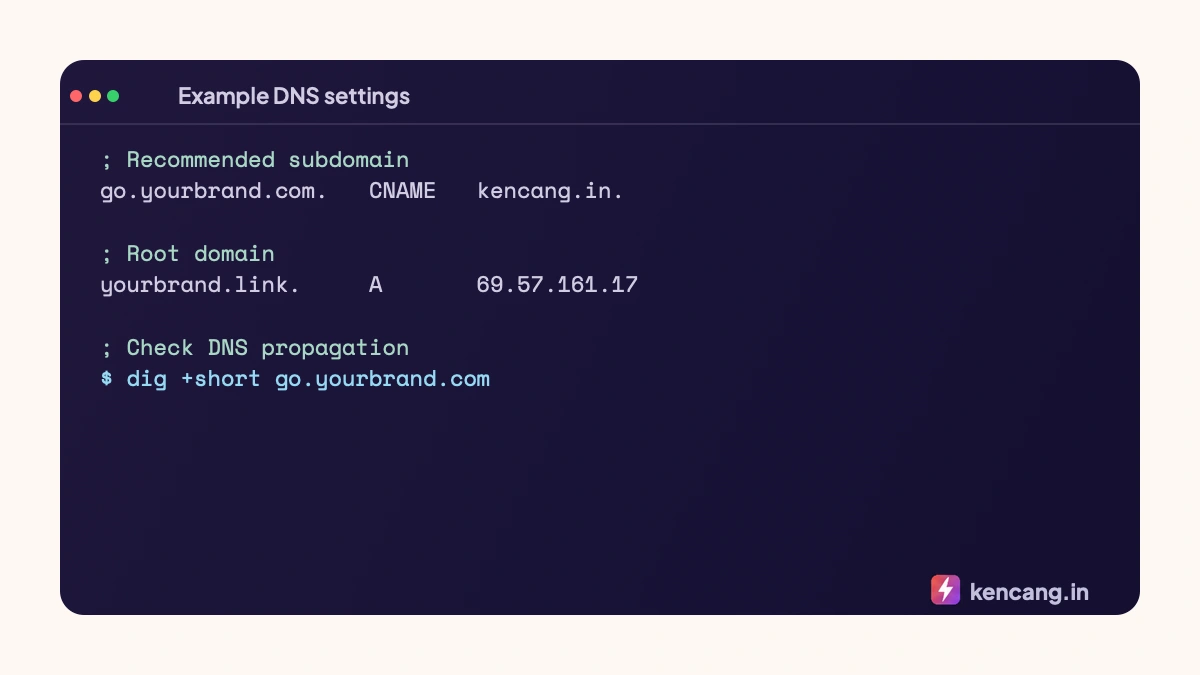
If your DNS is on Cloudflare, keep the record set to DNS only (gray cloud), including after the domain is active.
Advanced settings
- Default domain: determine which domain is automatically used when creating a new link.
- Root redirection: determine where visitors are directed when opening
go.yourbrand.comwithout aliases, for example to the main site. - Custom 404 page: redirect missing aliases to a page of your choice.
- Multiple domains: the Business plan allows up to 5 domains, useful for agencies managing several clients, with teams managed through team collaboration.
Branded domains and QR codes
A QR code created from a link on your own domain displays your domain when scanned, so visitors see your brand name before opening the page. This increases the scan-to-visit rate for printed materials. Learn more on the QR Codepage.
Common problems and solutions
Verification failed: double check that the record is pointing to the correct value and that there are no old records that are colliding. SSL is not active yet: wait a few minutes after verification; if proxy Cloudflare is active, turn it off temporarily. Conflicting aliases: aliases are unique per domain, so go.yourbrand.com/promo and kencang.in/promo can be owned by different parties.
Ready to try it? Branded domains are included in the Pro plan; see the details and 7-day trial on the pricingpage.
Frequently asked questions
Do I need to buy a new domain?
Not necessarily. The easiest method is to use a subdomain of a domain you already own, such as go.yourbrand.com. A subdomain is free, inherits the main domain's reputation, and needs only one CNAME record to connect to Kencang.in.
How long does the domain verification process take?
After you add the DNS record, the domain usually becomes active within a few minutes, and may take longer depending on your DNS provider. Click Check Now on the domain list or wait for the automatic check; the SSL certificate is set up automatically and you get an email when the domain is active.
What happens to old links if I change domains?
Links with old domains will still work as long as the domain is still connected to your account. You can add a new domain, make it the default for new links, and leave the old domain active until the material containing it is no longer in circulation.
Can a bio page use a branded domain?
Yes. Once your domain is verified, a bio page can be published at an address such as go.yourbrand.com/@name, and QR codes created from links on your own domain display your brand name when scanned.