
 Tim Kencang.in
Short links hide their destinations, which can be abused. Trust is therefore the foundation of a link-shortening service: if visitors hesitate to click, every other benefit loses its value. This article openly explains our security layers, what you can do as a link owner, and how visitors can verify a link before opening it.
Security layers at Kencang.in
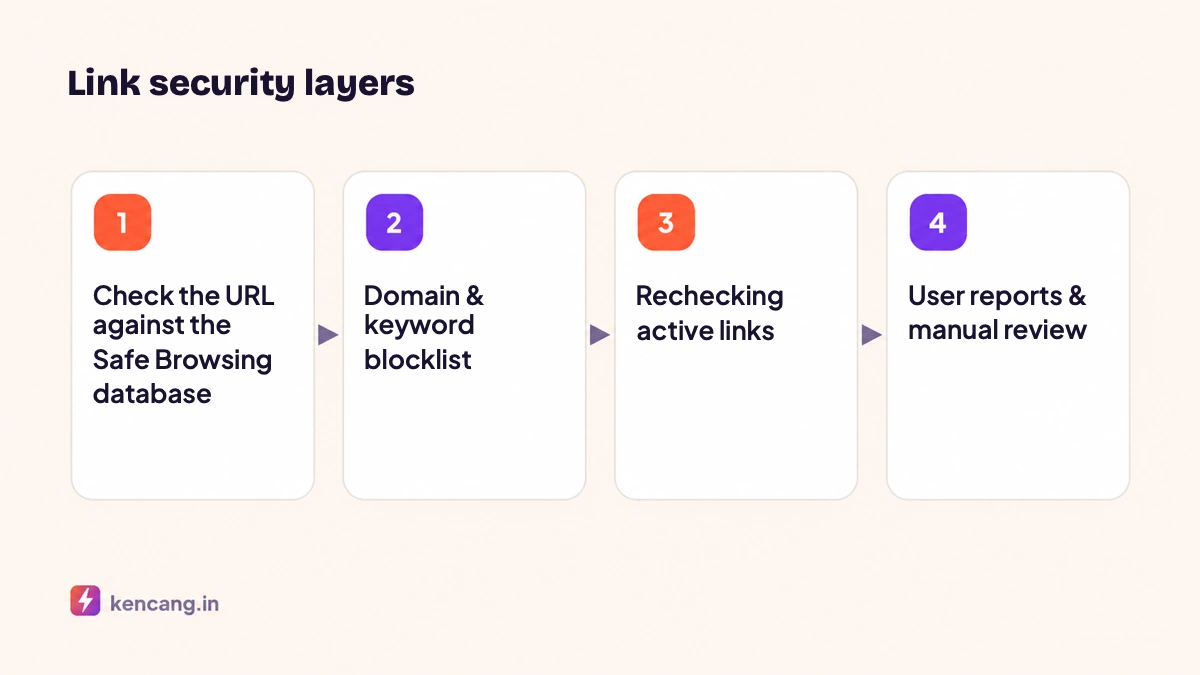
1. Checks when a link is created
Every destination URL is checked against threat databases, including Google Safe Browsing, which contains known phishing and malware sites. The matching URL is rejected and cannot be shortened. This check also applies when the destination is changed via the dashboard or API.
2. Domain and keyword blocklists
We maintain a list of domains and word patterns commonly used in scams. Links to those domains are rejected, and aliases impersonating well-known brands to mislead visitors are not allowed.
3. Ongoing checks
A site that is secure today could be hacked tomorrow. Active links are rechecked periodically, and links whose destination turns malicious are automatically disabled, and their owners are notified.
4. User reports
Anyone can report a link through the Reportpage. Our team reviews reports, and links proven to violate our Terms & Conditions are deleted, along with the offender's account if necessary.
5. HTTPS on all links
All kencang.in links and connected branded domains are served via HTTPS with auto-issued certificates, so redirects cannot be intercepted or changed mid-stream.
Link verification for visitors
Visitors who are unsure can view a destination before opening it: add a + sign to the end of the link, for example kencang.in/promo+, to open a preview showing the destination URL and public statistics if enabled. This follows general security advice to check links before clicking, as explained in the CISA guidance on recognizing phishing.
What you can do as the link owner
- Use a branded domain. Visitors recognize your name; see article branded domains.
- Use honest aliases. Aliases should describe the destination; see tips in the article on custom aliases.
- Set up previews. Fill in the title, description, and meta image so that the preview card on WhatsApp and social media matches the content of the page.
- Protect your account. Enable two-factor authentication (2FA) in Settings > Security. A hacked account can be used to redirect your links to malicious sites.
- Secure your API keys. Save in environment variables and revoke unused keys; see article getting started with the API.
- Use passwords and expiration for sensitive content; see article expiring links and click limits.
Security at the team level
On the Business plan, team members get separate access rights. Grant editing rights only to those who need them, and review the member list periodically. The activity log helps track who changed the link destination. Full explanation in the article team collaboration.
If your link is disabled
You will receive an email with the reason. If you believe something went wrong, for example your site has just been cleaned of malware, please contact us via contact page and include the link alias. We recheck the link and reactivate it if safe.
Our commitment
We do not serve intermediary ads, do not sell click data, and process IP addresses only momentarily for geolocation and abuse prevention. Details are in Privacy Policy. Security is rarely visible, but every safe click helps maintain trust in your brand.
Frequently asked questions
How can visitors tell whether a kencang.in link is safe?
They can add a plus sign to the end of the link to see the destination before opening it. Link owners can also use branded domains so visitors recognize the source.
What happens if my destination site is hacked?
Ongoing checks detect destinations that become dangerous, disable the links automatically, and email you. Once the site is clean, contact us to reactivate the link.
Does Kencang.in store visitor IP addresses?
IP addresses are only processed momentarily to determine location and prevent misuse, and are not stored permanently. Stored statistics contain country, approximate city, device, and browser.
How can I report a suspicious link?
Use the Report page and include the link alias and a brief reason. Our team reviews every report; links found in violation are disabled, and the offender's account may be suspended.