
 Tim Kencang.in
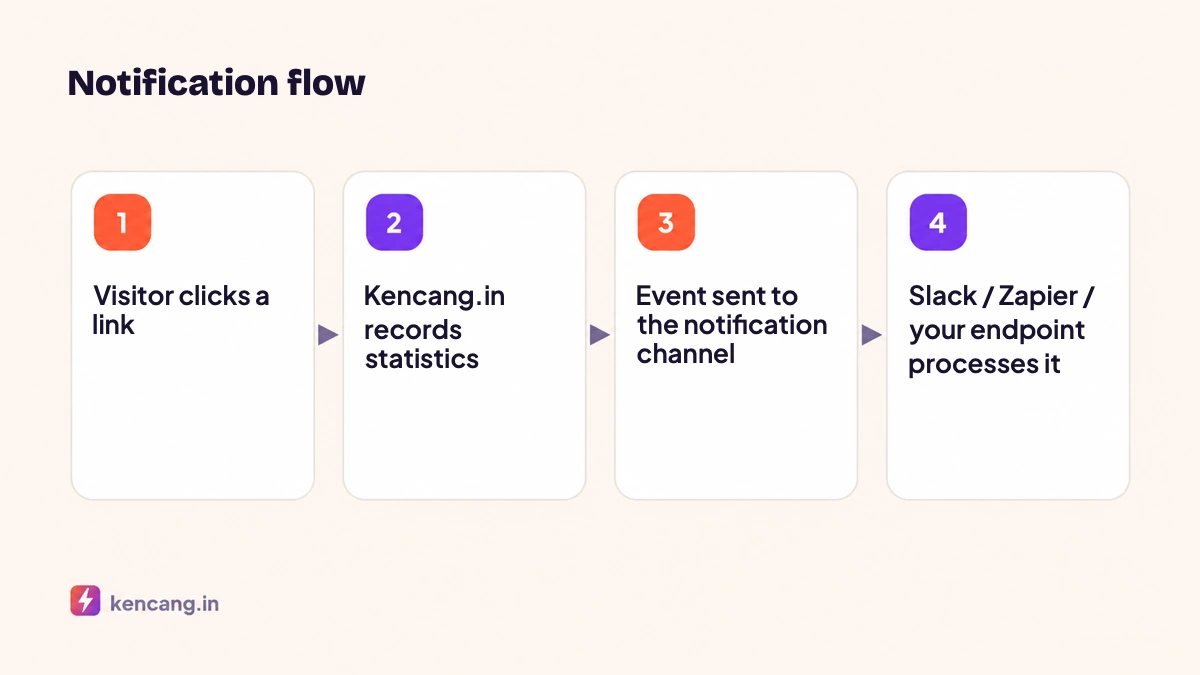
Dashboard statistics answer "how many". Real-time notifications answer "what is happening now". When a new campaign launches, the team wants to know when the first click arrives, where it comes from, and whether the ads are really running. Kencang.in supports three notification channels: Slack, Zapier, and custom webhooks to your own server.
Enabling notification channels
Open the dashboard and the Channels or Integrationsmenu, then choose the channel to connect. Each link can send to one or several channels. Notifications are available on Pro and Business plans; see the pricing page.
Slack
- Click Connect Slack and allow the Kencang.in app to access your workspace.
- Select the destination channel, e.g
#kampanye. - In the link settings, enable notifications and select the Slack channel.
Every click sends a short message: alias, location, device, and referral source. For high-volume links, use hourly summaries to avoid filling the channel. Once the app is installed, you can also create links directly from Slack with the command /kencang https://... . See Slack's API documentation at api.slack.com.
Zapier
Connect Zapier in the Integrations menu, then create a Zap with the trigger "Kencang.in: New Click" (or Webhooks by Zapier "Catch Hook" using the URL we provide). Click data can then go anywhere: a new Google Sheets row, a Trello card, a WhatsApp Business API message, or an email. Connecting Zapier in the opposite direction, to create links automatically, is covered in the article on Zapier and Google Sheets.
Custom webhooks
For direct integration with your system, enter an HTTPS endpoint URL. Every click sends a POST request with a JSON body.
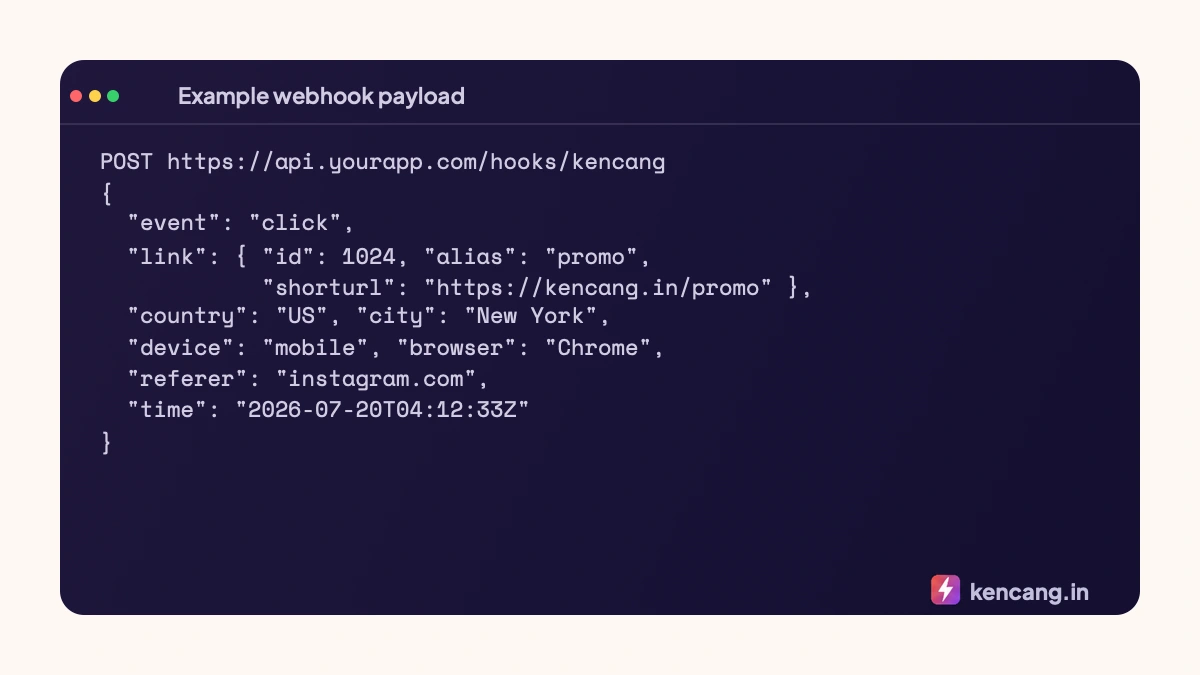
Your endpoint must respond with status 2xx within a few seconds. On failure, we retry several times with increasing delays. Best practices for the receiver:
- Reply quickly, process later. Receive payload, queue it, reply 200, then process it in the worker. Don't do heavy work in requests.
- Verify source. We include an HMAC signature header based on the secret shown in the dashboard. Recalculate the HMAC from the raw body and compare it before processing. Use a constant-time comparison such as
hash_equals()in PHP. - Idempotent. Retries mean the same event can arrive twice. Save the event ID or an alias + time combination to detect duplicates.
- Use HTTPS with valid certificate. Webhooks to plain HTTP are rejected.
The general principles of designing reliable webhook receivers are well summarized in GitHub webhook best practices guide, and most of them apply to any service.
Minimal receiver example (PHP)
<?php
$raw    = file_get_contents('php://input');
$sig    = $_SERVER['HTTP_X_KENCANG_SIGNATURE'] ?? '';
$secret = getenv('KENCANG_WEBHOOK_SECRET');

if (!hash_equals(hash_hmac('sha256', $raw, $secret), $sig)) {
    http_response_code(401);
    exit;
}
$event = json_decode($raw, true);
// masukkan ke antrean, mis. Redis/database
http_response_code(200);
Ways to use it
- Anomaly detection: a spike in clicks from one country in a minute could mean bots; send an alert.
- Sales attribution: match click times to incoming orders to estimate conversions per channel.
- Lead scoring: clicks from personal links (
/budi,/sari) directly updates CRM. - Internal dashboard: show real-time clicks on the office screen at launch.
You can also pull the same data periodically through the statistics API; choose webhooks when you need speed, and the API when you need full reports. See the developer documentation for details of both approaches.
Frequently asked questions
Does every click send one Slack message?
Yes, by default. For high-volume links, select hourly summaries to avoid flooding the channel, or send notifications to a custom webhook and aggregate them yourself before sending to Slack.
How can I verify a webhook really comes from Kencang.in?
Every request includes an HMAC signature based on the secret shown in the dashboard. Recalculate the HMAC from the raw body and compare it to the header using a constant-time comparison before processing the data.
What happens if my server is down?
We retry several times with increasing delays. If every attempt fails, the event is skipped and recorded as failed in the dashboard. Click statistics remain stored on Kencang.in and can be retrieved through the API.
Can one link send to multiple channels?
Yes. One link can be connected to Slack, Zapier, and multiple custom webhooks at once. Each channel receives the same payload, so marketing teams and internal systems get identical data.