
 Tim Kencang.in
The Kencang.in API lets your application create, read, update, and delete short links, QR codes, and bio pages without opening the dashboard. This article is a starting point: getting a key, request formats, and a first example you can run in five minutes. Complete documentation for each endpoint is available on the developer page.
1. Getting an API key
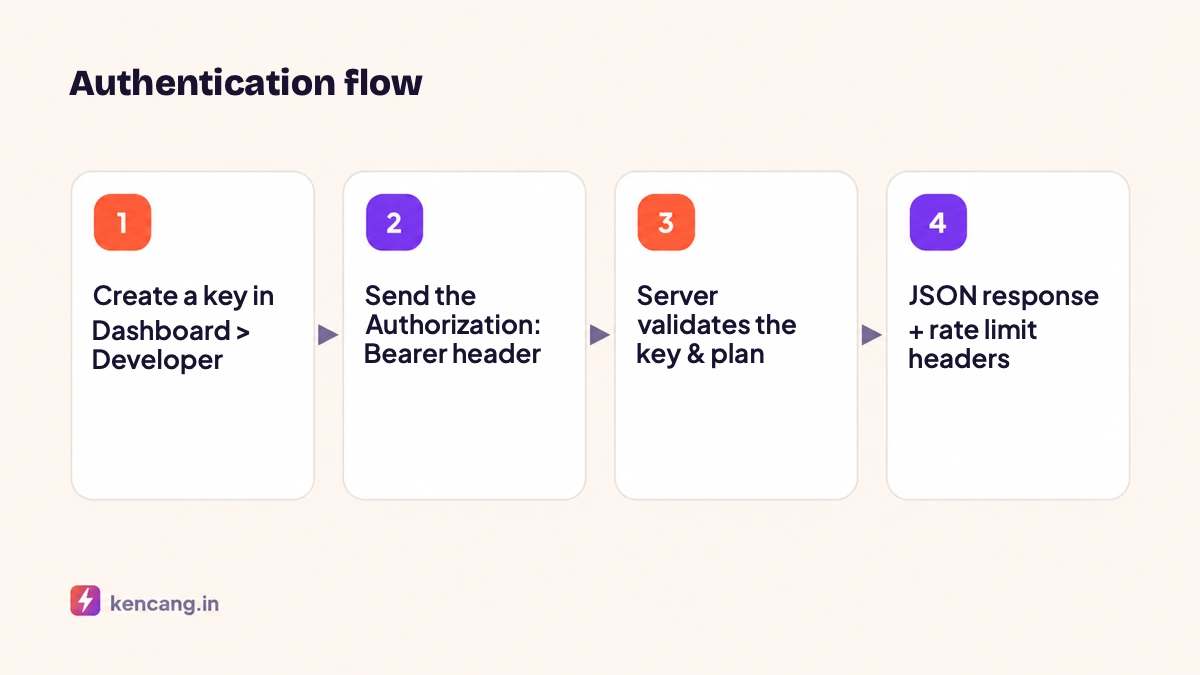
Sign in to the dashboard and open the Developer menu (or Settings > API). Every account has one primary key, and you can create additional keys with different names for each application, so a leaked key can be revoked without disrupting other integrations. API access is available on Pro and Business plans; see the limits on the pricingpage.
2. Authentication
Every request must include the Authorization: Bearer YOUR_API_KEYheader. The Bearer scheme follows RFC 6750. Requests without a key or with a revoked key receive HTTP 401. Always send requests over HTTPS; keys sent over plain HTTP are considered exposed.
3. Request and response format
The API accepts and returns JSON. Include the Content-Type: application/json header on POST and PUT requests. Every response has an errorkey: a value of 0 means success; otherwise there will be a message explaining the problem. Check this key before reading other data. The JSON format follows the specification at json.org.
4. First request: create a short link
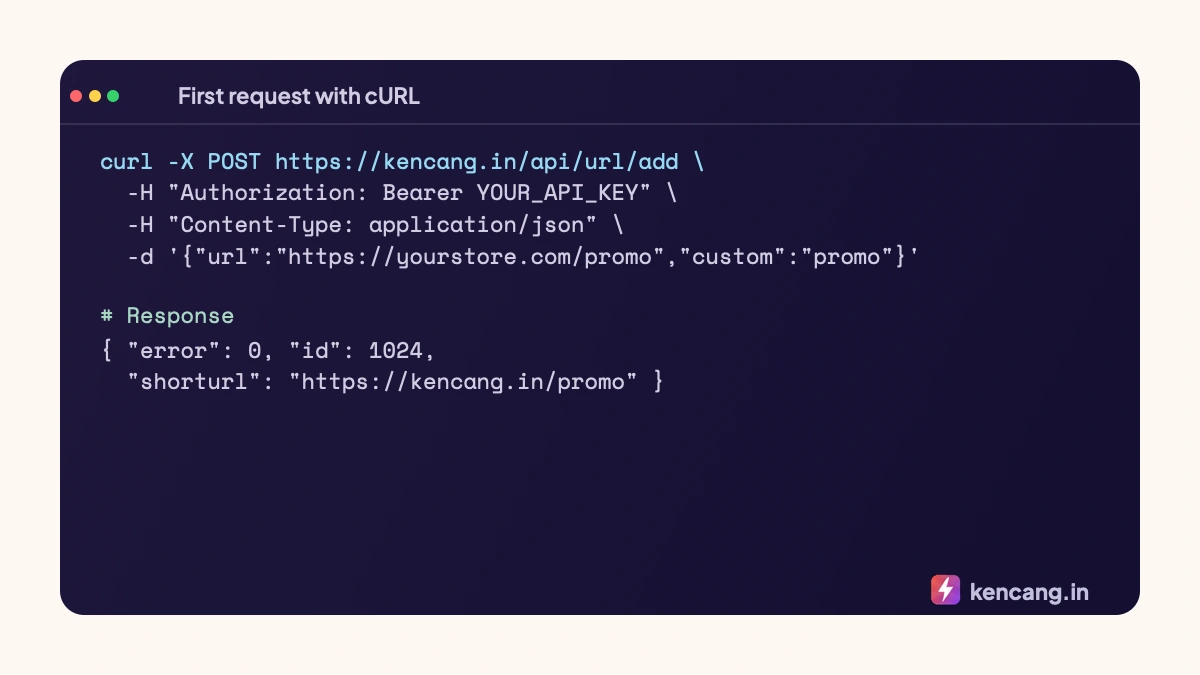
Common parameters used in link creation endpoints:
url(required): the destination URL, which must start with http:// or https://.custom: custom alias. If empty, a random alias is created.domain: a verified branded domain on your account.password: password protection.expiry: expiration date in YYYY-MM-DD format.type: redirect type, such asdirectorsplashfor custom landing pages.metatitle,metadescription: preview title and description.geotarget,devicetarget,languagetarget: targeting rules in array form.
The response contains the link id and a shorturl ready to share. Save the id if your application needs to update or delete the link later.
5. Reading and managing links
GET /api/urls: list of links with pagination (parameterspage,limit,order).GET /api/url/{id}: details of one link along with brief statistics.PUT /api/url/{id}/update: change destination, alias, or other settings.DELETE /api/url/{id}/delete: delete link.
Similar endpoints are available for QR codes, bio pages, campaigns, domains, and pixels. Find examples in several programming languages in the separate article on creating short links through the API with PHP, Python, and JavaScript.
6. Rate limit
Every plan has a per-minute request limit. The response headers X-RateLimit-Limit and X-RateLimit-Remaining show the remaining quota, and requests exceeding the limit receive HTTP 429. We discuss handling strategies in the article on rate limits and error handling.
7. API key security practices
- Store the key in an environment variable or secret manager, not in the code repository.
- Never use keys in browser-side JavaScript or distributed mobile applications; create an intermediary backend.
- Create separate keys per application and revoke unused keys.
- General recommendations for managing secrets can be read at OWASP Secrets Management Cheat Sheet.
Next steps
After the first successful request, you can automate the creation of links from the spreadsheet via Zapier and Google Sheets, or receive real-time click notifications via webhook and Slack.
Frequently asked questions
Is the API available on the Free plan?
API access is available on Pro and Business plans. The Pro plan gets 60 requests per minute and the Business plan 300 per minute. The 7-day trial period on paid plans includes full API access to test the integration.
What if my API key leaks?
Immediately revoke the key from the Developer menu and create a new one. Each key is independent, so integrations using different keys are unaffected. Also check request logs for suspicious activity.
Does the API support creating QR codes and bio pages?
Yes. Besides links, there are endpoints for QR codes, bio pages, campaigns, domains, pixels, and statistics. All endpoints use the same Bearer authentication and return JSON with a consistent error and message structure.
Can I call the API from a mobile app or browser JavaScript?
It is best not to, because the API key would be visible to users. Create an endpoint on your own backend that securely stores the key and forwards requests to the Kencang.in API.