

 Tim Kencang.in
Marketing teams often manage a list of campaigns in a spreadsheet: content name, destination URL, platform, go-live date. The “open dashboard, create link, copy back to sheet” step is manual work that is easiest to automate. This article shows three ways: Zapier for no code, Make as an alternative, and Google Apps Script for those who want full control without subscription fees.
Preparation
You need an API key from the Kencang.in dashboard (Developer menu) and an understanding of one endpoint: POST /api/url/add with the JSON body {"url": "...", "custom": "..."}. If you are unfamiliar with this, first read the API getting started guide.
Method 1: Zapier
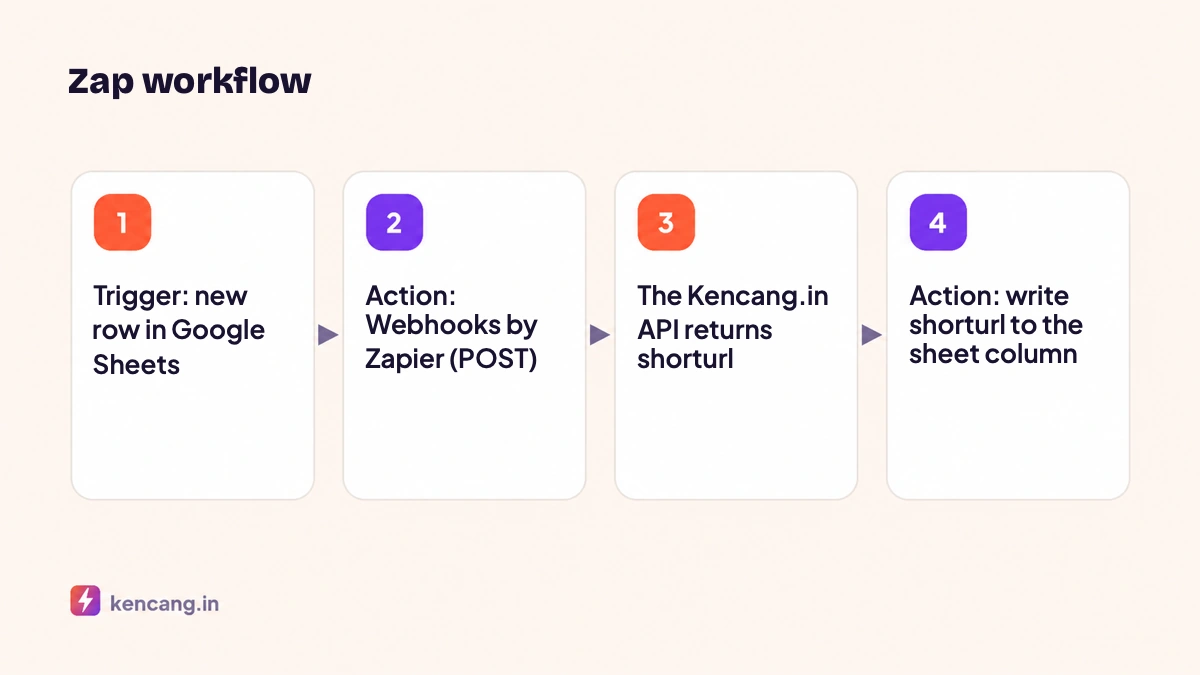
- Trigger: select Google Sheets, event "New Spreadsheet Row". Connect your account and select your campaign sheet.
- Action: select "Webhooks by Zapier", event "Custom Request". Method POST, URL
https://kencang.in/api/url/add. - In Headers, add
Authorizationwith valueBearer KUNCI_APIandContent-Typewith valueapplication/json. - Under Data, enter JSON mapping the sheet columns:
{"url": "{{URL Tujuan}}", "custom": "{{Alias}}"}. - Second action: Google Sheets "Update Spreadsheet Row", fill in the "Short Link" column with the value
shorturlfrom the webhook step.
Zapier also offers official integrations for many applications, so you can replace the trigger with a new WooCommerce order, a new Facebook Lead Ads lead, or a Typeform submission. Kencang.in provides a built-in Zapier connection in the Integrations menu for click notifications; see the article on webhooks and Slack. Webhook module documentation is available at Zapier's help center.
Method 2: Make (formerly Integromat)
The flow is similar: Google Sheets "Watch Rows" as the trigger, HTTP "Make a request" to call the API, then Google Sheets "Update a Row". Make displays the JSON response visually, so mapping shorturl to a column takes only a click. Make's advantage is a lower cost per operation at high volumes.
Method 3: Google Apps Script (free)
If you only use Google Sheets, Apps Script eliminates the need for intermediary services. Open the Extensions menu > Apps Script in your spreadsheet, save the API key in Script Properties (not in the code), then add the following function.
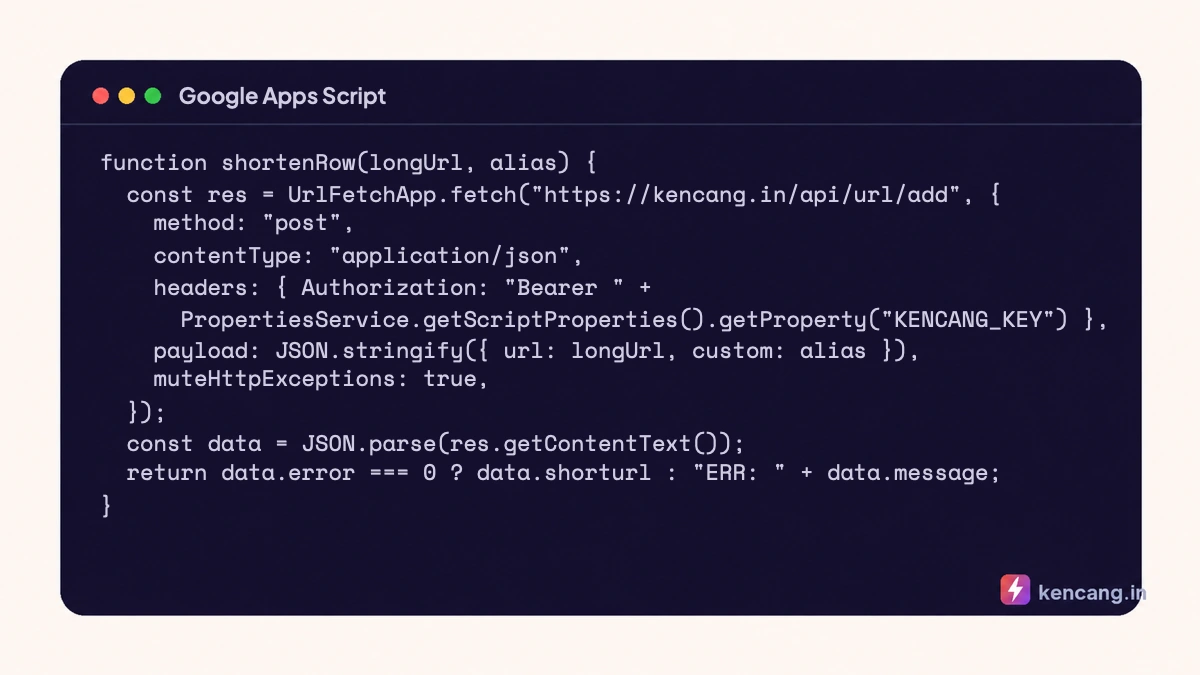
Once saved, you can call the function directly from the cell: =shortenRow(B2; C2). To avoid repeated calls whenever the sheet recalculates, use an onEdit trigger or a menu button that processes rows with an empty short-link column, then writes results as fixed values. Find the UrlFetchApp documentation on Google Developers.
Things to watch
- Rate limit. If you paste 200 rows at once, Zapier or Apps Script sends 200 requests. Add a delay or process them in batches; see the article on rate limits and error handling.
- Duplicate aliases. If an alias is already taken, the API returns an error message. Write the message to a sheet column so it is visible, or leave the alias blank for the system to generate a random one.
- UTM. Add UTM columns to the sheet and append them to the destination URL before sending, so every link automatically carries tracking parameters. See the guide to UTM parameters for advertising.
- Security. The API key on Zapier is stored in your Zapier account; limit who can edit the Zap. In Apps Script, don't share spreadsheets with edit rights to people who don't need to see the keys.
Further development
After automating link creation, the next step is usually to pull click statistics back into the sheet periodically through the GET /api/url/{id}endpoint, so campaign reports populate themselves. The same pattern applies to bulk QR codes. Every endpoint is documented on the developer page, and API access is available on the Pro plan and above (see pricing).
Frequently asked questions
Which is cheaper, Zapier, Make, or Apps Script?
Apps Script is free because it runs in your Google account, but requires a little code. Make is generally cheaper than Zapier for large volumes. Zapier is the easiest to use and has a built-in Kencang.in integration for click notifications.
Can links created from Zapier be edited in the dashboard?
Yes. Links created through API, including from Zapier or Make, appear in the dashboard like any other link and can be edited, grouped into a campaign, or deleted at any time.
What if the sheet contains an invalid URL?
The API returns an error message for that row. Configure the flow to write the error message to the result column so you can identify the failed row, then fix its URL and rerun just that row.
Can I pull the click statistics back to the sheet?
Yes, by scheduling the link detail endpoint calls periodically via Apps Script or Zapier Schedule, then writing the number of clicks into the report column. This makes the campaign report auto-populate.