
 Tim Kencang.in
Creating a short link on Kencang.in requires no installation, and a simple link does not even require an account. This guide shows the quickest method, then covers options available only after you sign in to the dashboard: custom aliases, password protection, expiration, and targeting.
The quickest method: without an account
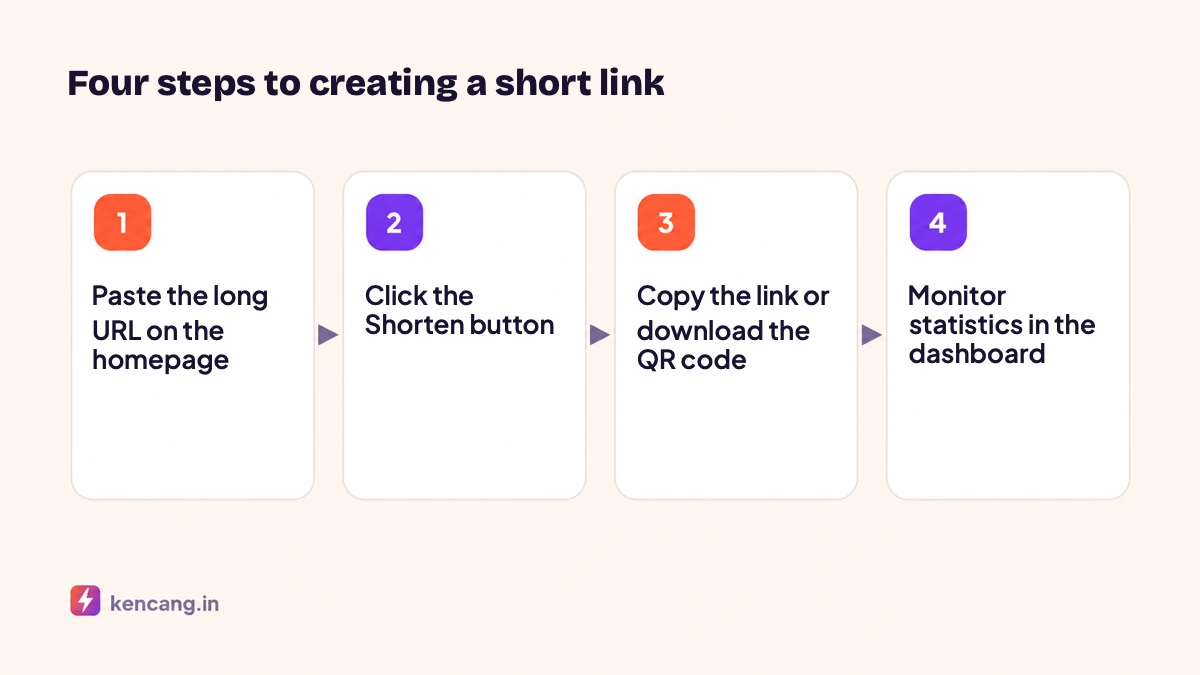
- Open the Kencang.in homepage.
- Paste your long URL into the "Paste your long link here" field.
- Click the Shortenbutton.
- Your short link appears along with its QR code. Click Copy to copy it to the clipboard.
Links created without an account still have their statistics recorded, but you cannot edit them later. For business use, we recommend creating a free account first.
With an account: full control
Register with an email address and password, or sign in with Google. Once signed in, the Links menu in the dashboard displays a more complete form.
Custom alias
Enter the word you want in the alias field, for example year-end-sale. Aliases may contain only letters, numbers, and hyphens, and must be unique. If someone else already uses an alias, the system will notify you. We discuss tips for choosing effective aliases in the article on custom aliases.
Meta title and description
By default, Kencang.in retrieves the title from the destination page. You can change it so previews on WhatsApp, Telegram, or Facebook show your chosen title and image.
Password protection
Enter a password if only certain people should be able to open the link, such as for internal materials or prerelease files. Visitors will see a small page requesting the password before being redirected.
Expiration and click limits
Set an expiration date or maximum click count. Once reached, the link can redirect to another page you specify. This feature suits flash sales; learn more in the article on expiring links and click limits.
Targeting
In the advanced tab, you can set different destinations based on country, device, or browser language. iPhone users can go to the App Store, Android users to Google Play, and desktop users to a web page.
Sharing links
Once saved, each link has a copy button, social media sharing buttons, and a QR code download button. The downloaded QR code uses the same alias, combining scan and click statistics in one report. If you want a QR code whose destination can change without reprinting, use the Dynamic QR Codemenu.
Reading statistics
Click the chart icon beside a link to open its statistics page. It shows total and unique clicks, daily charts, country and city maps, device and browser types, and referral sources. We explain how to interpret each panel in the article on reading the analytics dashboard.
Creating multiple links at once
If you have dozens of URLs, use the Import feature with a CSV file, or use the API to automate the process from your own application. Find the guide in the article on getting started with the Kencang.in API.
Frequently asked questions
Can my short link expire on its own? No, unless you set it to. Links on the Free plan remain active as long as your account is active.
Can I change the destination after sharing a link? Yes, from the dashboard, and changes take effect immediately for all visitors.
Is there a limit on the number of links? The Free plan includes 100 links. See the pricingpage for details.
Frequently asked questions
Can I edit a short link after creating it?
Yes, as long as you created the link while signed in to your account. Open the Links menu in the dashboard, select the link, then change the destination URL, title, targeting settings, or expiration. Changes take effect immediately for all visitors without sharing the link again.
Why was my chosen alias rejected?
An alias must be unique for each domain and contain only letters, numbers, and hyphens. If another user already uses it or it is a reserved system word such as login or api, choose a variation, for example by adding a year or campaign name.
Can short links created without an account be tracked?
Basic statistics are still recorded and can be viewed by adding /stats after the alias if public statistics are enabled, but you cannot manage or export them. Create an account for a complete dashboard and a history of all your links.
How do I create multiple links at once?
Use the Import menu with a CSV file containing URL and alias columns, or call the link creation endpoint through the API from your application. Both produce links with the same settings as manual creation, including statistics for each link.