
 Tim Kencang.in
A customer following an Instagram ad can land on a web login screen even when the destination app is installed. For supported applications, a deep link can open the intended content in the app. A fallback destination serves visitors who cannot open it.
What is a deep link?
A deep link opens specific content within an app rather than merely opening the app. On Android, this mechanism is called App Links; on iOS, Universal Links. Both let an installed app handle a regular web URL. Official documentation is available from Android Developers and Apple Developer.
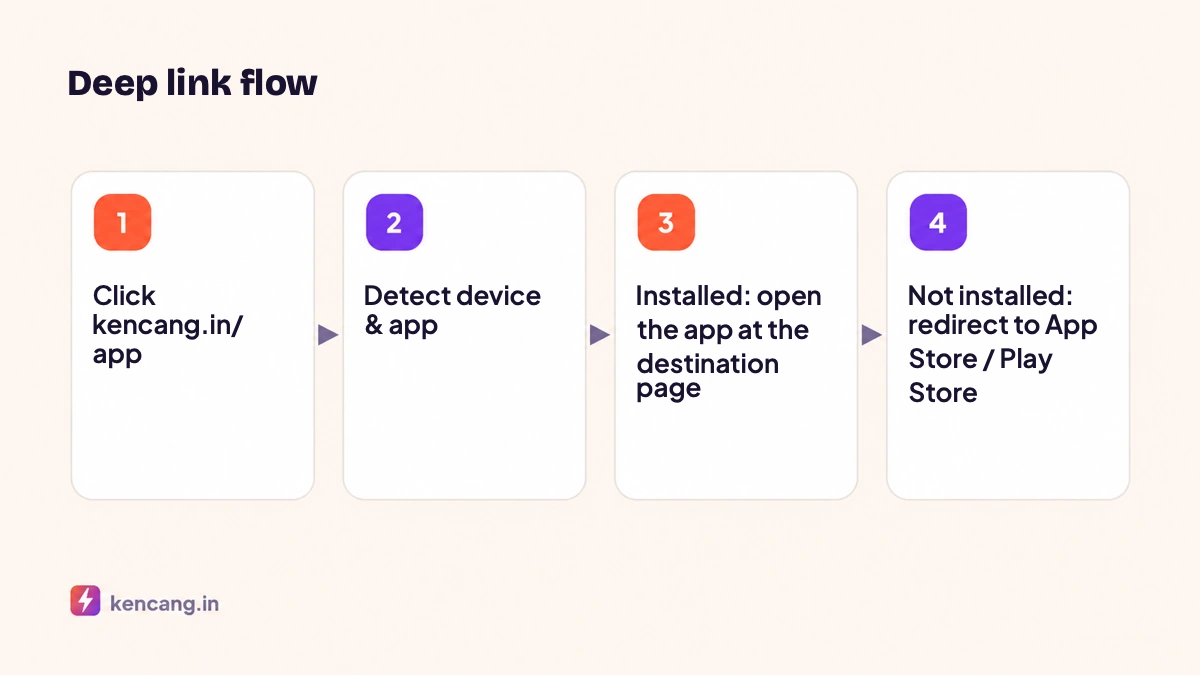
How it works on Kencang.in
When you enable deep linking on a short link, Kencang.in recognizes destination URLs for popular apps and automatically builds the scheme to open them. When clicked on a phone, a lightweight intermediary page tries to open the app; if that fails quickly, the visitor goes to a fallback URL, usually an app store page or the web version. On desktop, the link opens the web version directly.
Supported applications
Automatic link recognition supports Airbnb, AliExpress, Amazon, Apple Music, Facebook, Grubhub, Instagram, LinkedIn, Messenger, Netflix, Pinterest, Snapchat, Spotify, Telegram, TikTok, Twitch, X, Walmart, WhatsApp, Wolt, Yelp, YouTube, Zoom. Enable deep linking for a supported destination URL. For your own app, enter its iOS and Android links in the custom deep-link settings, with a suitable web or app-store fallback.
Deep links for your own applications
If you have your own app, use device targeting combined with a custom deep link:
- Define the main URL as the web page (fallback for desktop and other devices).
- Set the iOS-specific URL to an app scheme or Universal Link, with an App Store URL as fallback.
- Set the Android-specific URL to an App Link or intent, with a Play Store URL as fallback.
Kencang.in tries to open the app first, then falls back to the app store if it is not installed. Ensure your app's domain association files are configured (assetlinks.json for Android, apple-app-site-association for iOS) so the operating system allows automatic opening.
Uses in advertising
- Product ads: use a supported Amazon or AliExpress product URL to send customers to the product in the app. For other stores or your own app, configure platform-specific links and a web fallback.
- App install campaigns: use one link in every creative; new users go to the app store, while existing users go straight to the promoted feature.
- QR codes on packaging: scan to open the loyalty application directly on the points claim page. Combine with dynamic QR codes.
- Video content: link to YouTube or TikTok opens the app, which usually provides a better viewing experience than a browser.
Measuring results
Link statistics record clicks by device, letting you compare the proportions of iOS and Android users. To find out how many end up in the app versus the store, create a separate fallback URL with dedicated UTM parameters, or monitor installs in the app store console during the campaign. Add pixels to the link to retarget visitors who have not yet installed the app.
Things to note
- Some in-app browsers, such as those in Instagram or Facebook, limit opening other apps. Kencang.in handles most cases with fallbacks, but test from the app where you advertise.
- Deep links to pages that require login will open the login screen first; This is the behavior of the destination application, not the link.
- Changes to destination URL can still be made at any time from the dashboard without changing the link.
Deep links are available on Pro and Business plans. Compare plans on the pricing page or try them directly in the dashboard with a 7-day trial.
Frequently asked questions
Do deep links work in Instagram's in-app browser?
They work in most cases, but some in-app browsers limit opening other apps. Kencang.in automatically falls back to the web version or app store; test from the app where you advertise before launching.
Do I need an SDK for my own app?
No. Configure Android App Links and iOS Universal Links in your app, then enter each platform's specific URL and app store URL in the link settings. No additional code is needed on Kencang.in's side.
What if the application is not installed?
Visitors go to the App Store or Play Store for their device, or to your chosen fallback URL. After installing, users need to open the link again to reach the intended page.
Can I see how many visitors opened the app?
Statistics record clicks per device but cannot confirm whether the app actually opened, because that happens outside the browser. Use different UTM parameters on fallback URLs and monitor installs in the app store console.